
User Manual: Card Emulator
The Card Emulator application allows your device to mimic various NFC cards, primarily Mifare (often used for office/apartment access) and NTAG series cards.
Currently, the system supports up to 8 customizable slots.
1. Supported Card Types
The emulator can simulate the following standard card types:
-
Mifare Series (Access Control):
-
Mifare Mini
-
Mifare 1K / 2K / 4K
-
-
NTAG Series (Tags & Stickies):
-
NTAG 210, 212, 213, 215, 216
-
Mifare Ultralight C
-
Mifare Ultralight EV1 (640 / 1312 bits)
-
⚠️ Note: NTAG emulation is currently in Beta. Some features (specifically full NTAG125 emulation) are incomplete and still being tested.
2. The Main Interface
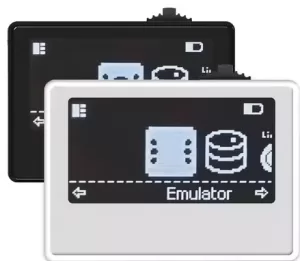
When you enter the Card Emulator, the screen displays the active card's details:
-
Top Line: Card Number (e.g.,
[01]) and the Card UID (e.g.,de:ad:be:ef). -
Middle Line: The custom Name of the card (e.g.,
< Slot 01 >). -
Bottom Line: Technical details:
-
Type: e.g.,
MF 1K -
SAK/ATQA: Protocol identifiers (e.g.,
<08/04 00>) -
Write Status: A disk icon indicates writing is allowed; a crossed-out icon means it is read-only.
-
Important Usage Rule: Emulation is only active while you are on this screen. If you exit to the main menu, the device stops emulating the card.
3. Advanced Settings (Expert Mode)
⚠️ Warning: These settings are intended for advanced users who understand NFC protocols. Incorrect changes here can cause the emulation to fail. If you run into trouble, reset the slot to default settings.
To access Advanced Settings, select a card and open the sub-menu.
Customization Options
-
Custom Mode:
-
OFF (Default): The device reads the ID/SAK/ATQA directly from Sector 0 of the stored data.
-
ON: Allows you to manually input a fake ID, SAK, and ATQA in the menu options below, overriding the actual file data.
-
"Magic Card" Features
These settings allow the device to mimic "Magic" (Chinese backdoor) cards, which are often used for cloning:
-
Gen1A Enabled: Allows the emulator to respond to "Magic Backdoor" commands. This lets writers unlock the card without knowing the access keys (common in older cloners).
-
Gen2 Enabled: Enables writing to Sector 0. This is required if you want to change the Manufacturer Block (UID) of the card via a writer.
Write Modes
You can control how the emulator handles incoming write requests from a reader:


Comments
No comments yet. Be the first to share your thoughts.